Your taste stays with you
“For you” learns locally on your device. You decide whether the app can keep learning.
Universal app for iPhone and iPad · in the App Store
Choose a movie on the sofa, watch a downloaded episode on a trip or open your own profile on a shared tablet: TELOS brings your own catalog to iPad. A watchlist, Continue Watching and local recommendations keep your selection personal.
Check compatibility in the App Store. Playback requires payment after the trial; your own account is required.
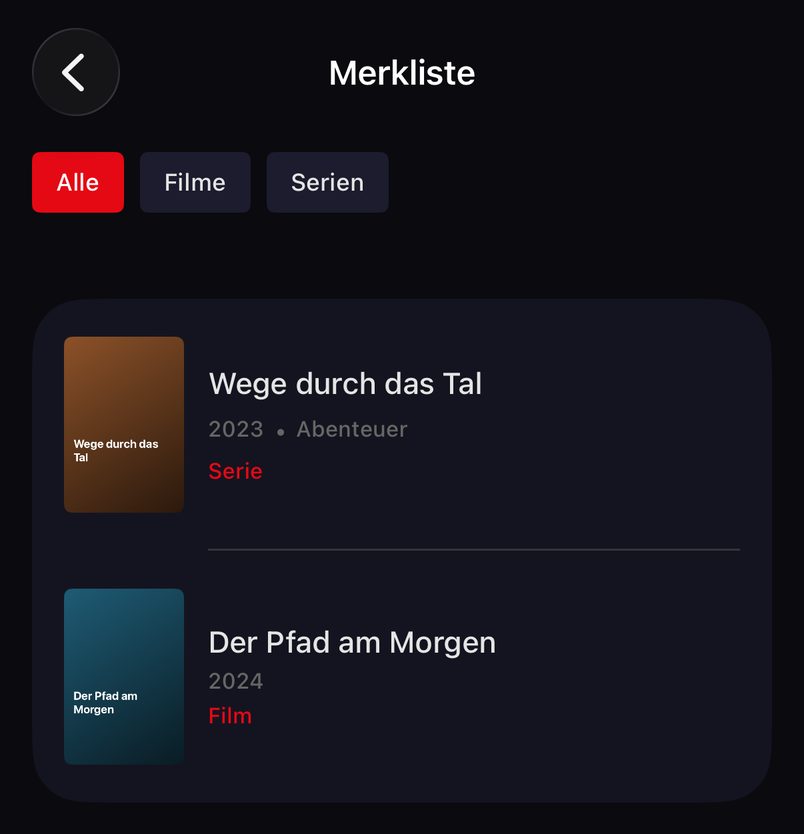
The universal app for iPhone and iPad combines personal areas with content from your own source.
“For you” learns locally on your device. You decide whether the app can keep learning.
Favorites, watchlist, history and downloads for each profile. Up to five profiles per Xtream account.
Watch eligible movies and episodes offline with an Xtream source and the required download conditions.
Kids profiles show approved content; the household PIN protects leaving the profile.
TELOS opens live TV, movies and series from your own account on iPad. Connect Xtream or an M3U link and use the content your provider supplies. The universal app is available for iPhone and iPad; on the tablet, your personal selection has its own place in everyday life.
Collect interesting movies and series on your watchlist instead of remembering titles. Continue Watching brings you back to started content. Favorites and search help you find what you need. For a smaller screen, see the dedicated page for TELOS on iPhone.
If several people use the iPad, separate profiles help you return to your own history and watchlist. Up to five profiles are available per Xtream account. Favorites, history, Continue Watching, downloads, audio and subtitle choices are assigned personally.
A kids profile shows approved content and requires the household PIN to leave it. Kids profiles do not learn tastes. The profile answers on this page explain how personal areas work. Extra profiles do not automatically increase your provider’s connection limit.
First choose the right personal area and approve the content that should appear there. A kids profile is a selection you configure from the existing catalog. TELOS does not supply an additional children’s service independently of your provider.
Review the approved selection yourself before handing over the tablet, and keep the household PIN with the adults. This PIN is required to leave the kids profile. An age label in the catalog does not replace your own selection. Kids profiles also do not learn personal tastes; their selection is not created from adults’ recommendation rows.
When another family member uses the iPad afterward, choose their profile. Their watchlist and Continue Watching remain assigned to their personal area. See the family profile answers for how to separate selections.
The “For you” row adds local recommendations alongside your saved titles. TELOS uses your viewing on the iPad. Data for this recommendation logic does not leave your device; your viewing habits are not analyzed in a cloud.
Under “Settings > Taste”, pause learning, view interests or reset them. You can shape your personal selection rather than just accept a general list. The controls let you decide whether TELOS can continue learning from what you watch.
TELOS includes no channels or content subscriptions. Your own legal provider account determines what you can play on iPad. For Xtream, enter the complete server and account details; for M3U, use your playlist link.
With a suitable XMLTV source, TELOS can also show a programme guide for M3U playlists. The XMLTV address comes from the source details or the playlist’s url-tvg reference. M3U catch-up is not supported; the download method described here requires Xtream. Suitable data and reachable content from your provider are still required. If you use the same playlist on your TV too, observe your provider’s simultaneous connection limit. The iPad FAQ helps distinguish these topics.
If you want to avoid depending on a live connection while traveling, download eligible movies and episodes beforehand. The download button is on the detail page; your saved selection is under “My TELOS”. The app uses Wi-Fi by default; check free storage on your iPad too.
You need an Xtream source with the provider proxy switched off. Whether a specific title is eligible depends on your provider. Downloads are unavailable for M3U sources. Plan around titles that have actually been saved. The download answers on this page explain the requirements.
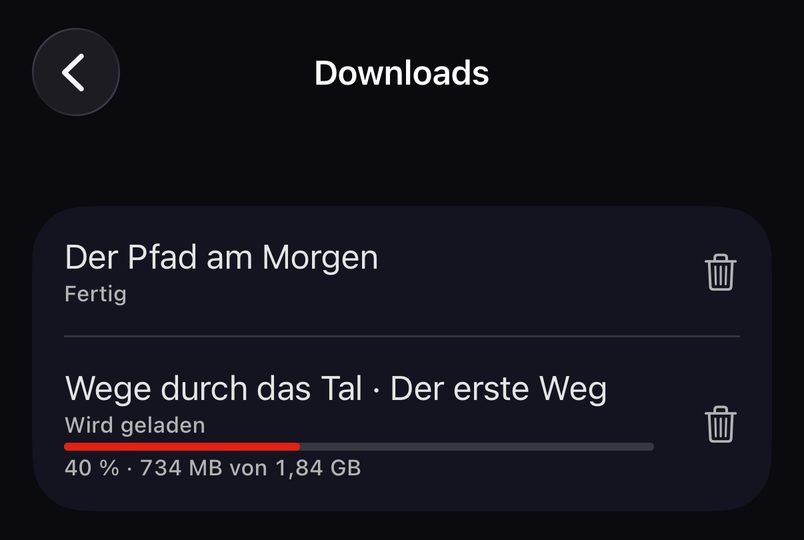
Before a trip, prepare a small selection instead of a large, unchecked download plan. Open the detail pages of eligible movies or episodes, download them over Wi-Fi, then check saved titles under “My TELOS”. A short test without a connection shows whether your prepared episode is actually available before departure. Check the profile you will use later too.
For the same product family on your TV, there is a native TELOS version for Apple TV. It runs on a dedicated Apple TV device with different storage rules: tvOS may delete cached files. Automatic transfer of iPad downloads or profiles to the TV is not promised here. For your phone, see TELOS on iPhone.
One list is free; additional lists require Premium. Playback requires a purchase after the trial. For your TV, see TELOS on Apple TV with its different storage and device requirements.

TELOS is a universal app for iPhone and iPad. Find it in the same official App Store listing and check your iPad’s compatibility there.
Up to five profiles are available per Xtream account. Personal favorites, history and Continue Watching help separate selections. For children, there is approved content and a household PIN.
The platforms differ. iPad offers offline downloads under the stated conditions; Apple TV uses a cache that tvOS may delete.
Yes, eligible titles can be downloaded in advance. You need an Xtream source, the provider proxy switched off and enough storage. Downloads depend on your provider; M3U sources do not offer this feature.
Your watchlist collects movies and series for later. Continue Watching returns you to titles you have started. These personal areas belong to the relevant profile.
No. A watchlist entry does not include an offline download. Download an eligible title separately, check completion under “My TELOS” and test it without a connection before traveling.
That transfer is not promised. Saved titles are stored on the relevant device. Apple TV also uses a cache that tvOS may delete and has its own download requirements.
Find additional lists under “Settings > Lists”. One list is free; additional lists require Premium. Playback requires a purchase after the trial. Your provider still supplies the content and sets the connection limit.
Open TELOS in the App Store, connect your account and collect favorites. Prepare eligible movies and episodes before your next trip.
TELOS is a player for your own legal content source. No channels, movies or content subscriptions are included.